• About Us
  • Contact
  • Trang chủ
  • Code
  • Linux
  • Virtualization
  • Mail
  • Tools
No Result
View All Result
System Zone
No Result
View All Result
Home Lập trình web Cpanel

[WHM] Cài đặt CSF Firewall trên WHM/cPanel

admin by admin
21 Tháng mười một, 2025
in Cpanel, Linux
0
0
SHARES
2
VIEWS
Share on FacebookShare on Twitter

CSF (ConfigServer & Firewall) là 1 gói ứng dụng hoạt động trên Linux như 1 Firewall được phát hành miễn phí để tăng tính bảo mật cho server (VPS và Dedicated). CSF hoạt động dựa trên iptables và tiến trình ldf để quyét các file log để phát hiện các dấu hiệu tấn công bất thường.

Related Posts

Cài đặt sử dụng Rclone trên Centos 7

Lỗi service mysql không thể start:[ERROR] mysqld: Table ‘./mysql/global_priv’ is marked as crashed

Hướng dẫn viết script sync dữ liệu giữa 2 VPS linux qua SSH key

Hướng dẫn cài đặt MongoDB 5 trên centos 7

Hôm nay mình sẽ hướng dẫn mọi người cài đặt CSF vào WHM cPanel.

Step 1: SSH vào VPS centos 7 đã cài sẵn WHM và setup CSF

cd /usr/local/src/
wget https://download.configserver.com/csf.tgz
tar -xzf csf.tgz
cd csf
sh install.sh

Step 2: Config trong CSF

Vào trình quản lý của WHM Home >> Plugins >> ConfigServer Security & Firewall

Ở mục csf – ConfigServer Firewall >> Firewall Configuration

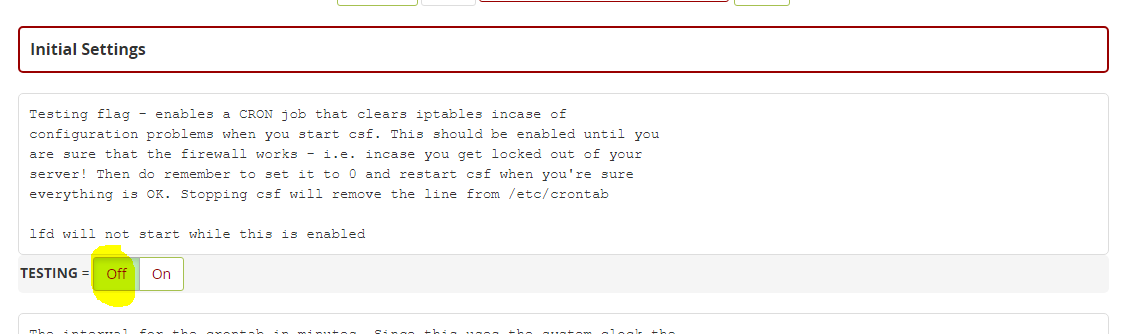
1.Off Testing
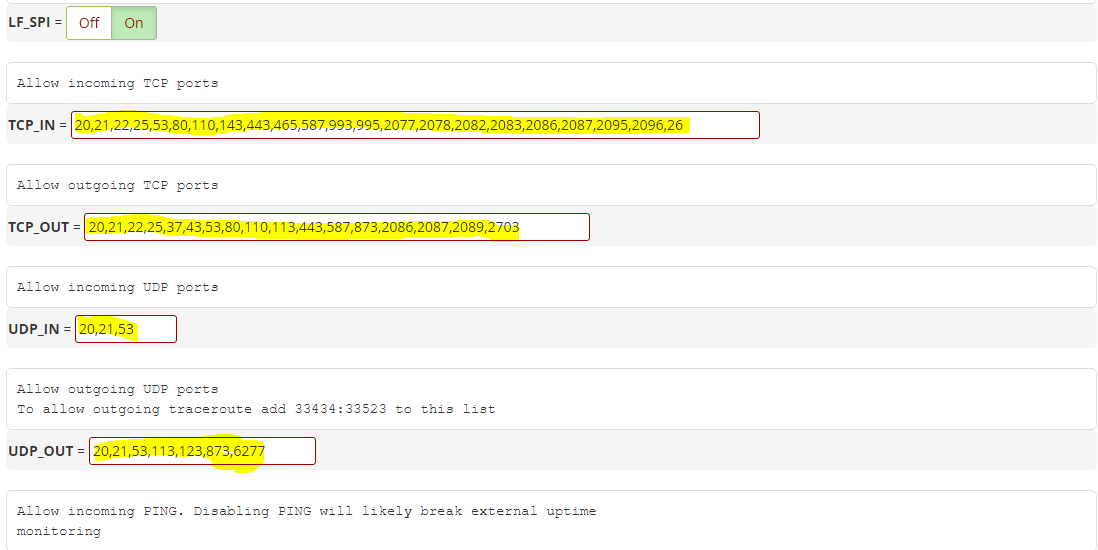
2. Setting port

  • TCP_IN = “20,21,22,25,53,80,110,143,443,465,587,993,995,2077,2078,2082,2083,2086,2087,2095,2096,26”
  • TCP_OUT = “20,21,22,25,37,43,53,80,110,113,443,587,873,2086,2087,2089,2703”
  • UDP_IN 20,21,53
  • UDP_OUT 20,21,53,113,123,873,6277

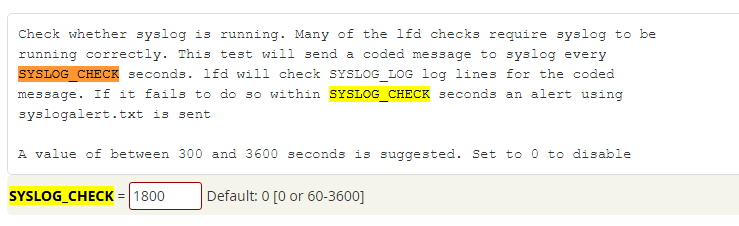
3. Active the Syslog Monitoring
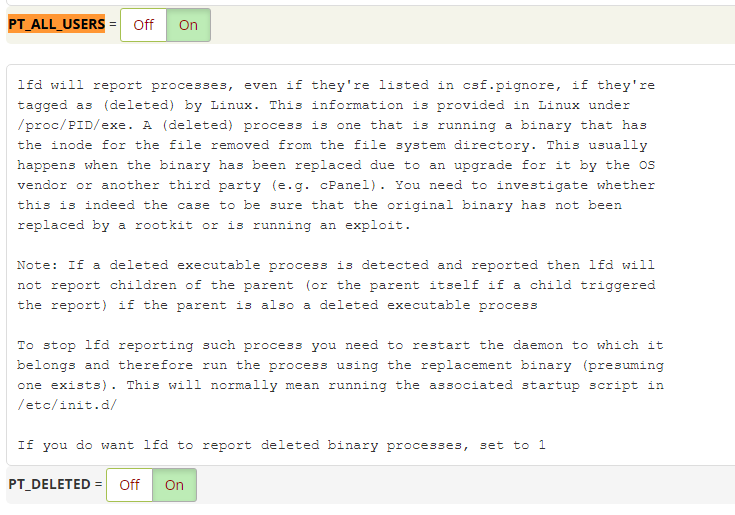
4. Activate the Detection of Suspicious Processes

  • Set “PT_ALL_USERS” to “ON“
  • Set “PT_DELETED” to “ON“

5. Activate Spam Protection and Detection of Suspicious Emails

SMTP_BLOCK to On.

LF_SCRIPT_LIMIT and set it to 250

LF_SCRIPT_ALERT to On
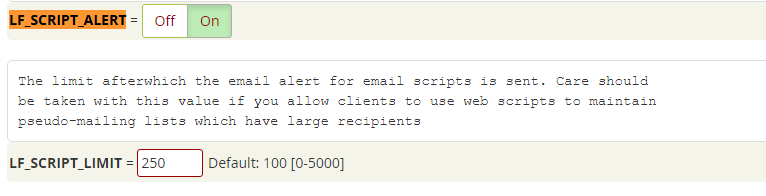
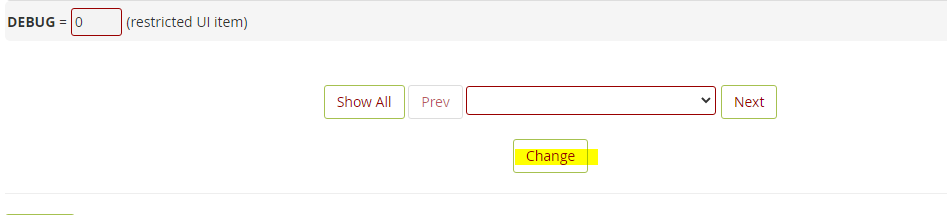
5. Save the Changes and Confirm the Status
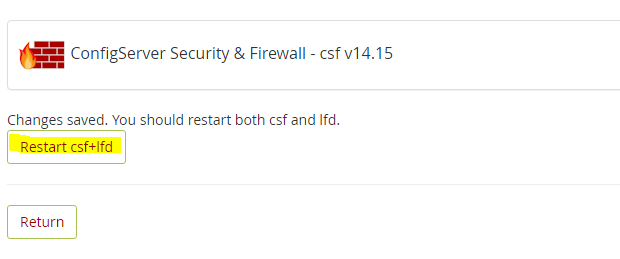
Chọn Restart csf+lfd
Tags: Cài đặt CSF FirewallCài đặt CSF Firewall trên WHM/cPanelCSFCSF FirewallCSF Firewall trên WHM/cPanel
Next Post

Các command Linux cần thiết cho IT

5 1 đánh giá
Đánh giá bài viết
Theo dõi
Đăng nhập
Thông báo của
guest
guest
0 Góp ý
Cũ nhất
Mới nhất Được bỏ phiếu nhiều nhất
Phản hồi nội tuyến
Xem tất cả bình luận

Danh mục

  • Cpanel (8)
  • Directadmin (4)
  • Gsuite (1)
  • Kiss Daily Talk (3)
  • Lập trình web (7)
  • Linux (20)
  • Mail (2)
  • MDaemon (1)
  • Mongo DB (1)
  • Plesk (1)
  • Windows (2)
  • Xâm nhập thế giới hacker (4)
  • Zimbra (2)

Bài viết mới

  • Cài đặt sử dụng Rclone trên Centos 7
  • Điều chỉnh daily report trong Zimbra
  • Phân quyền user trong Zimbra
  • Fix lỗi Misdirected Request trên Plesk
  • Lỗi service mysql không thể start:[ERROR] mysqld: Table ‘./mysql/global_priv’ is marked as crashed
  • Mail
  • Virtualization
  • Lập trình web
  • Linux Administrator
  • Learning More

© 2025 SystemZone - Premium WordPress news & magazine theme by Aitemat.

No Result
View All Result
  • About Us
  • About Us
  • blog
  • Campaign
  • Cart
  • Checkout
  • Cửa hàng
  • Giỏ hàng
  • Giới thiệu
  • Home 2
  • IT STORY
  • Lập trình web
  • Learning More
  • Linux Administrator
  • Mail
  • My account
    • Wishlist
  • Privacy Policy
  • Sample Page
  • Thanh toán
  • Track your order
  • Trang chủ
  • Trang Mẫu
  • Virtualization
  • Sections
  • Rows / Columns
  • Sliders
  • Buttons
  • Titles / Dividers
  • Blog Posts
  • Mega Shop
  • Simple Slider
  • Banner Grids
  • Icon Box
  • Lightbox
  • Scroll To
  • Pages
    • About
    • Contact
    • FAQ
    • Portfolio
  • Map
  • Message box
  • Product Categories
  • Products
  • Share / follow icons
  • Tabs
  • Team Member
  • Testimonials

© 2025 SystemZone - Premium WordPress news & magazine theme by Aitemat.

wpDiscuz
0
0
Rất thích suy nghĩ của bạn, hãy bình luận.x
()
x
| Trả lời