

Bạn đang sở hữu một website và bạn muốn nó thật khác biệt so với các website khác. Hôm nay mình sẽ hướng dẫn mọi người viết một javascript hiển thị chế độ tiết kiệm năng lượng cực độc đáo.
Đầu tiên copy Script này vào notepad lưu lại với tên tiekiem.js
var idleTime = 0; var standby = false; function CheckInactivity() { idleTime += 10; if(idleTime > 60) { InitializeStandBy(); } } function InitializeStandBy() { if(!standby) { var h = 0; h = jQuery(window).height(); jQuery("#energysaving").show().css({ height: "0", width: "0", left: "50%", top: "50%" }).animate({ width: "100%", height: h, left: "0", top: "0", opacity: "1" }, 1000); standby = true; } } function StopStandBy() { if(standby) { jQuery("#energysaving").animate({ width: "0", height: "0", opacity: "0", left: "50%", top: "50%" }, 500); setTimeout('jQuery("#energysaving").hide();', 800); standby = false; } } document.write('<style type="text/css"> div#energysaving, div#energysaving * { -moz-border-radius: 0; -webkit-border-radius: 0; border: 0; background-color: #000000; } div#energysaving { margin: 0; padding: 0; position: absolute; left: 50%; top: 50%; opacity: 0; -ms-filter:"progid:DXImageTransform.Microsoft.Alpha(Opacity=0)"; filter: alpha(opacity=0); text-align: center; z-index: 100; } @media screen { body>div#energysaving { position: fixed; } } div#energysaving p { margin: 0; padding: 0; width: 100%; font-size: 18px; font-family: arial; color: #333333; position: relative; top: 40%; line-height: 20px; font-weight: bold; text-align: center; text-shadow: none; } div#energysaving p span { color: #555555; font-size: 12px; font-weight: normal; } div#energysaving div#copyrightOnlineLeaf { padding: 0; margin: 0; color: #333333; font-size: 12px; font-weight: normal; position: absolute; bottom: 20px; text-align: center; width: 100%; height: 20px; left: 0%; }</style>'); if(typeof(jQuery) == "undefined") { document.write('<script type="text/javascript" src="http://ajax.googleapis.com/ajax/libs/jquery/1.3.2/jquery.min.js"></script>'); } function InitJQuery() { if(typeof(jQuery) == "undefined") { setTimeout("InitJQuery();", 50); } else { jQuery(function() { jQuery(document).ready(function() { setInterval("CheckInactivity();", 10000); jQuery(this).mousemove(function(e) { idleTime = 0; StopStandBy(); }); jQuery(document).keypress(function(e) { idleTime = 0; StopStandBy(); }); jQuery("body").append('<div id="energysaving"><p>Chế độ tiết kiệm năng lượng<br /><span>Di chuyển chuột đễ trở lại trang đang xem</span></p><div id="copyrightOnlineLeaf">Technology Market - <font style="color: #666666;">Cogihomnay.com</font> - Cộng động IT Việt Nam</div></div>'); jQuery("#energysaving").hide(); }); }); } } InitJQuery();
Bạn có thể tùy chỉnh chữ vào website của bạn trong đoạn Script.
Sau đó upload vào thư mục gốc của website hoặc thư mục trong thư mục gốc thường là /var/www/html
Bước tiếp theo là bạn vào trang quản trị chọn Flatsome –> Advanced –> Global Setting
Tại phần Header Script gõ dòng code này vào:
<script type="text/javascript" src="https://systemzone.top/tietkiem.js"></script>
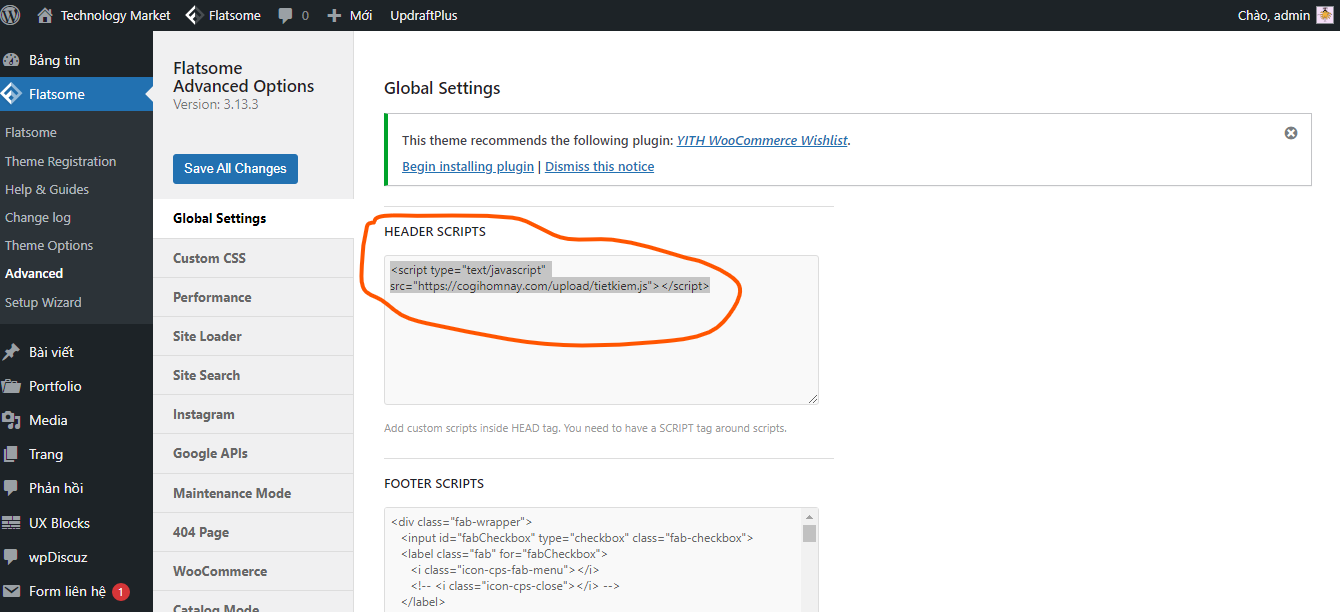
Chọn Save All Changes đễ lưu lại.
Ra trang web F5 và chờ tầm 15-20s đễ kiểm tra xem khi không hoạt động trên website thì nó có tự bật chế độ tiết kiệm năng lượng không nha.
Kết quả:
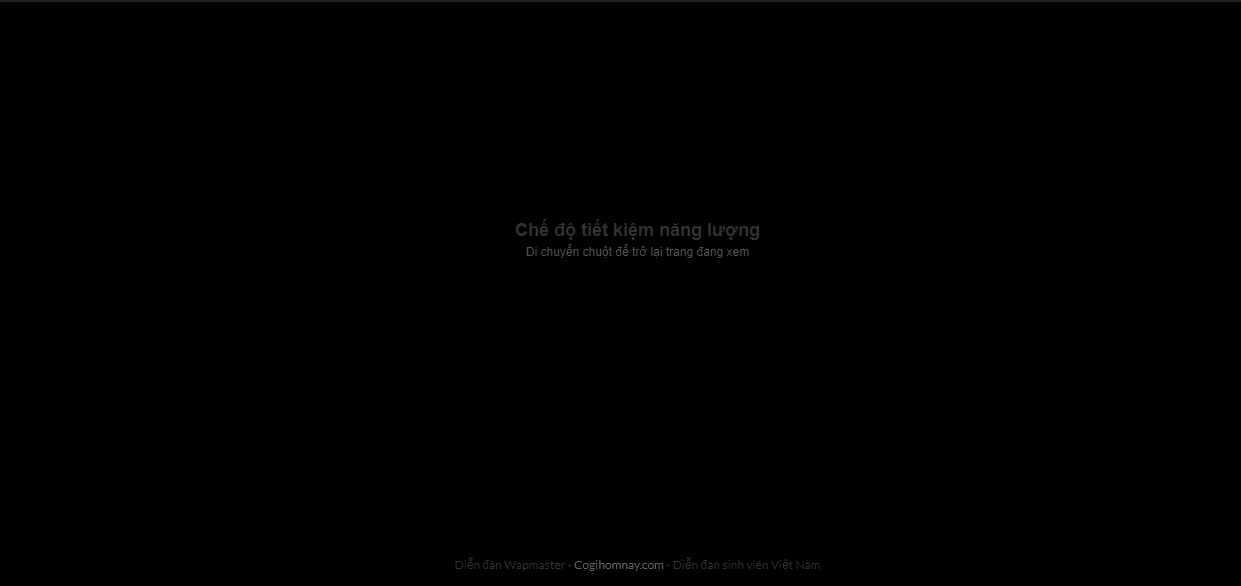
Các website hoặc theme khác các bạn chỉ cần đễ ở phần header là nó có thể hoạt động.
Chúc các bạn thành công với tút này nhé